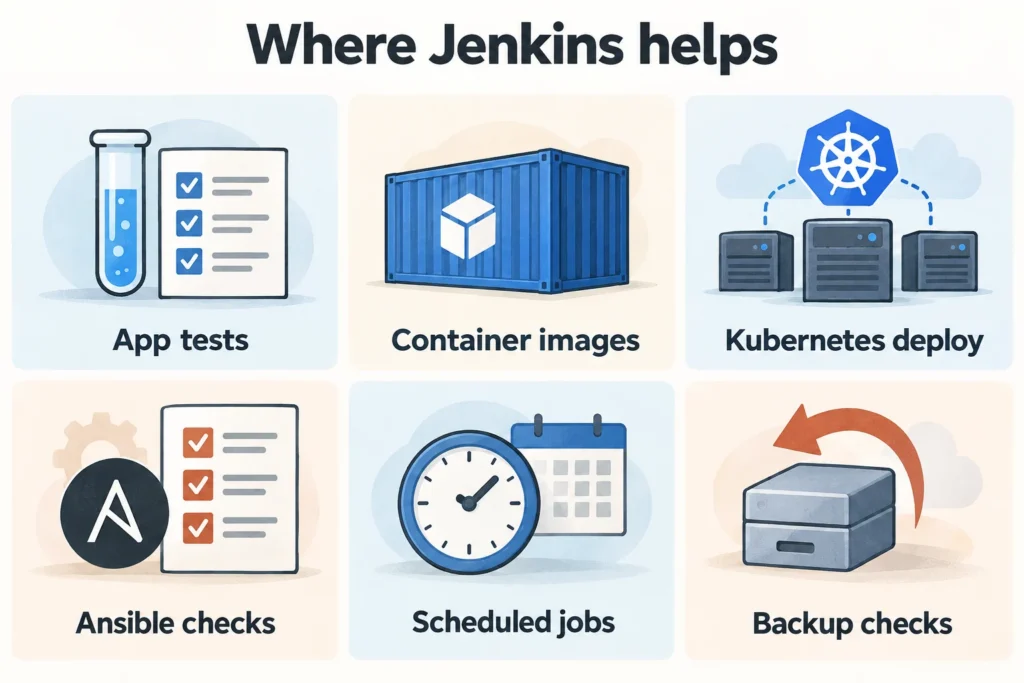
After automated tests work, plan the permissions and stopping points for the next automation stage. A build and a deployment need different access, and some changes require approval. The six examples below connect those decisions to image builds, Kubernetes and operational jobs.
Getting started with Jenkins · 01 Installing Ubuntu · 02 Installing Rocky Linux 9 · 03 First job and Pipeline · 04 Utilizing automation
The first task, 03, and Pipeline were exercises to test the prepared Linux agent and leave output. Here we’ll cover six use cases you can put on top of it. The registry, cluster, and account names below are examples and must be replaced with actual targets.
On this page
1. Automatically test when Git changes occur
If you have an SSH tunnel lab environment that is not accessible from the outside, you can start with Poll SCM. Because Jenkins checks for changes in the Git repository, the Git service does not need to connect directly to Jenkins. Add the following triggers inside pipeline of Jenkinsfile.
triggers {
    pollSCM('H/15 * * * *')
}
This setting checks for source changes approximately every 15 minutes; it does not unconditionally build on every cron trigger. H spreads scheduling across jobs rather than specifying an exact clock time. Run the job manually once so Jenkins reads the Jenkinsfile and registers the setting, then test change detection. See the Pipeline triggers and cron documentation for the syntax and behavior.
To reduce response time in a team environment, you can use webhooks tailored to services such as GitHub and GitLab. You will need the actual Jenkins address reachable via HTTPS, event type, authentication, and plugin configuration. The general receiving path for the GitHub plugin is /github-webhook/, and the settings in the plugin document are also applied. The localhost SSH tunnel address cannot be used as the receiving address for an external webhook.
Pull requests from external contributors also have different trust boundaries. Separate untrusted PR testing and deployment tasks/agents to avoid exposing operational tokens to anyone who can run your code.
2. Upload only container images that have passed testing
This example assumes a separate build agent labeled docker-ci, with Python, Git, the Docker CLI and access to a build engine. Replace the registry with its actual HTTPS address. Store a registry-push username and token in Credentials with push permission limited to the intended repository.
Add the Dockerfile to the repository root in Part 3. This image is an example to demonstrate the application packaging structure and is not a sample of running a network server or providing normal service responses from Kubernetes.
FROM python:3.12-slim
WORKDIR /app
COPY app.py ./app.py
USER 10001:10001
CMD ["python3", "-c", "from app import add; print(add(2, 3))"]
pipeline {
agent { label 'docker-ci' }
options {
skipDefaultCheckout(true)
disableConcurrentBuilds()
timeout(time: 20, unit: 'MINUTES')
buildDiscarder(logRotator(numToKeepStr: '20'))
}
environment {
REGISTRY = 'registry.example.com'
IMAGE_REPO = 'registry.example.com/team/demo'
}
stages {
stage('Checkout and test') {
steps {
deleteDir()
checkout scm
sh 'python3 -m unittest discover -s tests -v'
}
}
stage('Build image') {
steps {
script {
env.IMAGE_TAG = sh(
script: 'git rev-parse HEAD',
returnStdout: true
).trim()
}
sh 'docker build --pull -t "$IMAGE_REPO:$IMAGE_TAG" .'
}
}
stage('Push image') {
steps {
withCredentials([usernamePassword(
credentialsId: 'registry-push',
usernameVariable: 'REGISTRY_USER',
passwordVariable: 'REGISTRY_PASSWORD'
)]) {
sh '''
set +x
set -eu
DOCKER_CONFIG=$(mktemp -d)
export DOCKER_CONFIG
trap 'rm -rf "$DOCKER_CONFIG"' EXIT
printf '%s' "$REGISTRY_PASSWORD" | docker login \
"$REGISTRY" --username "$REGISTRY_USER" --password-stdin
docker push "$IMAGE_REPO:$IMAGE_TAG"
'''
}
}
}
}
post { cleanup { deleteDir() } }
}Using the commit SHA as a tag makes it easier to track which source was built. However, the tag itself can be pointed back to in the registry. In the operational distribution record, the push result image digest is also left. If even the base image needs to be reproduced with the same input, fix FROM as a verified digest and set the update procedure separately.
The password is read by the shell as an environment variable and is not inserted directly into the Groovy string. Files left behind by logins using temporary DOCKER_CONFIG are also cleaned up on exit. This configuration refers to Credentials Binding precautions and Docker’s password-stdin instructions. Log masking is not an access control that prevents credential misuse.
Access to the Docker daemon gives you strong control over the host. Rather than conveniently broadening privileges by mounting a Docker socket on a controller, scope execution in a dedicated agent or managed build environment.
3. Deploy the approved image to Kubernetes
This is a deployment job outline, separate from the earlier one-shot Python image exercise. It requires a previously verified web application image, a demo Deployment in namespace demo, and its app container. Prepare the readinessProbe and registry authentication before using it.
Prepare an API server connection with a compatible kubectl for the k8s-deploy agent. Create the Jenkins Secret file credential demo-kubeconfig to allow only the scope required for the corresponding namespace·Deployment lookup/patch/rollout verification. The example of uploading a personal cluster-admin kubeconfig as is is not used.
pipeline {
    agent { label 'k8s-deploy' }
    options {
        disableConcurrentBuilds()
        skipDefaultCheckout(true)
        timeout(time: 10, unit: 'MINUTES')
    }
    parameters {
        string(name: 'IMAGE_DIGEST', defaultValue: '',
               description: '검증된 이미지의 sha256:... 값')
    }
    stages {
        stage('Validate digest') {
            steps {
                script {
                    if (!(params.IMAGE_DIGEST ==~ /sha256:[0-9a-f]{64}/)) {
                        error('Use a verified sha256 image digest.')
                    }
                }
            }
        }
        stage('Approval') {
            steps {
                input message: 'demo 네임스페이스에 배포할까요?',
                      submitter: 'deploy-approvers'
            }
        }
        stage('Deploy') {
            steps {
                withCredentials([file(
                    credentialsId: 'demo-kubeconfig',
                    variable: 'KUBECONFIG'
                )]) {
                    withEnv(["IMAGE_DIGEST=${params.IMAGE_DIGEST}"]) {
                        sh '''
                            set +x
                            set -eu
                            kubectl -n demo set image deployment/demo \
                              app="registry.example.com/team/demo@$IMAGE_DIGEST"
                            kubectl -n demo rollout status deployment/demo --timeout=120s
                        '''
                    }
                }
            }
        }
    }
}
deploy-approvers is an example of an actually configured approver group. Just writing down the group name does not create a new user. You must first prepare the person/authority to approve, and the Jenkins administrator can approve it. Don’t make anyone call this action with a webhook; instead, tie a validated artifact to an approval process.
If rollout status fails, the Jenkins job will fail, but cluster changes already requested will not be automatically reverted. Look at the status, Pod events, and logs of the new ReplicaSet and decide whether to revert to the previous verified digest. Deployment revision and rollback operations can be found in Kubernetes official deployment document .
kubectl -n demo rollout history deployment/demo
kubectl -n demo get pods
kubectl -n demo describe deployment/demo
# 복구 대상으로 이전 리비전을 확인하고 승인받은 뒤 실행
kubectl -n demo rollout undo deployment/demo --to-revision=2
kubectl -n demo rollout status deployment/demo --timeout=120s
Revision 2 is an example. It must be replaced with a normal revision from the actual history. Since application image rollback does not revert DB schema or external system changes, these changes are separately reviewed for recoverability before deployment.
4. Pre-check server configuration changes with Ansible
If you apply the same package or settings to multiple servers, Jenkins can be the gateway to running Ansible. Place the inventory·playbook in a repository, prepare a dedicated agent, and the minimum required SSH permissions on the target server. The command below is an example of what can be entered as a shell command in an existing Jenkinsfile stage.
ansible-playbook -i inventories/lab/hosts.yml site.yml --syntax-check
ansible-playbook -i inventories/lab/hosts.yml site.yml --check --diff
--check is not a complete simulator that behaves the same in all modules. Unsupported tasks may be skipped or may not give sufficient results. Because --diff may reveal sensitive content in configuration files, tasks that deal with secrets also review the output policy. Ansible check·diff After checking the mode guide, separate the actual application into a separate approval step.
5. Run regular checks and leave failures behind
For example, you can check the expiration date of TLS certificates in your test environment every day or the existence of files for restoration. Use cron for schedule execution, not pollSCM. The code below is an example of the triggers part of the Jenkinsfile.
triggers {
    cron("""TZ=Asia/Seoul
H 2 * * *""")
}
This runs at a job-specific, distributed minute within the 02 hour in Seoul time. It does not mean exactly 02:00 each day. A maintenance script must return a non-zero exit code when it detects a failure so Jenkins can record the run as failed.
Connect notifications to channels already used by the team, but first prepare the recipient, SMTP or webhook credentials, and integration plugin. It is best to establish operating procedures that distinguish between the fact that a notification has been sent and the fact that a person in charge has confirmed the failure.
6. Try restoring a backup of Jenkins itself
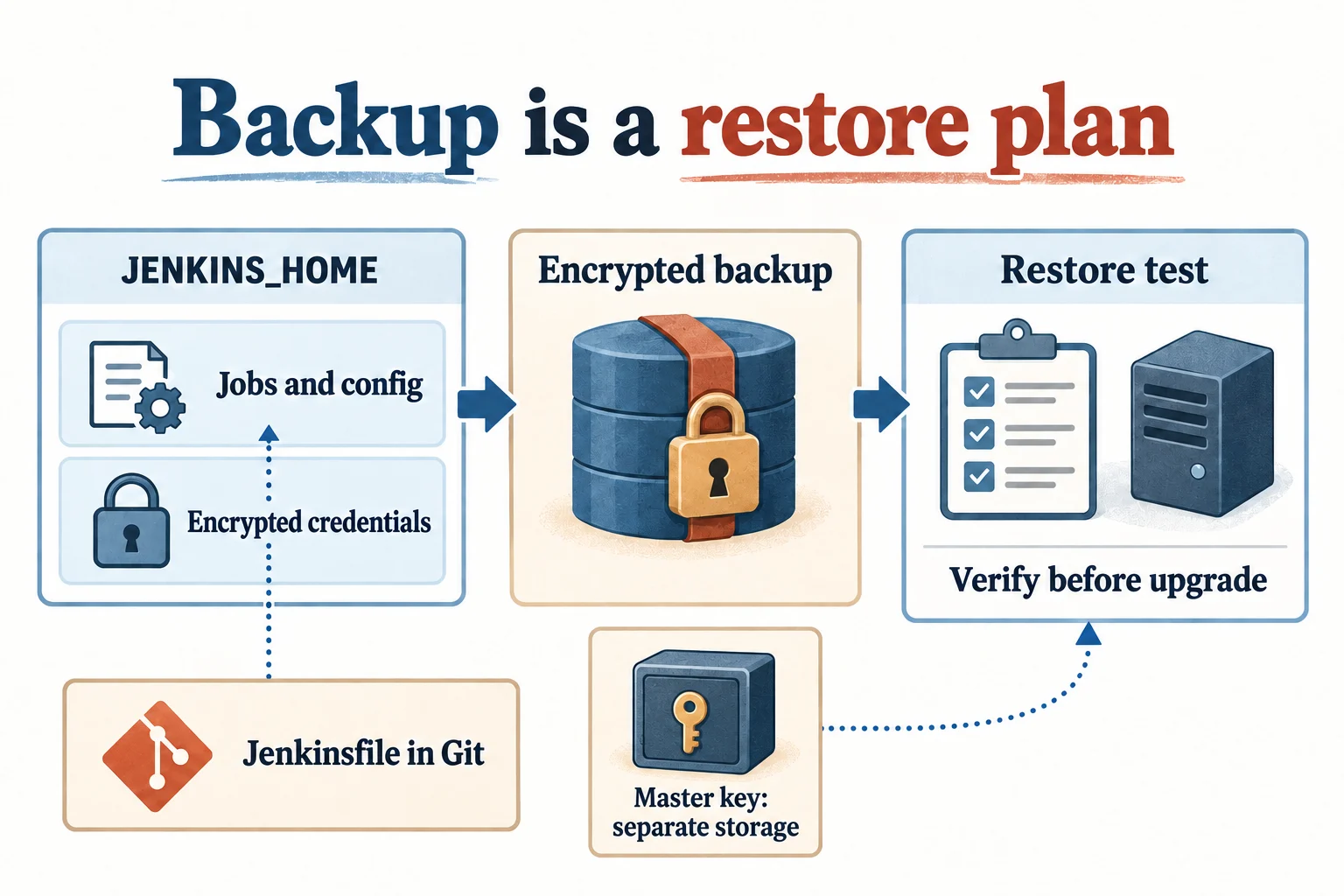
Even though the Jenkinsfile is in Git, user settings, credentials, and job history remain in Jenkins home. When installing a package, the location is usually /var/lib/jenkins. The actual value is checked at JENKINS_HOME in systemctl cat jenkins.
First, stop executing new tasks and set the time for ongoing tasks to end. Backups that require consistency are obtained by out-of-service or equivalently consistent snapshots. It is difficult to call a file that simply copies the directory being written by the service a backup that can be recovered immediately.
You need to design how to recover the keys needed to decrypt credentials, along with the settings and operation history. In particular, key keys such as secrets/master.key are protected and stored separately from general backups, and the backup body is also encrypted. If your credentials and decryption key are leaked together, your password protection may be defeated. Please first read the key handling instructions in the Jenkins backup/restore document.
- Records Jenkins·Java·plugin versions and installation list.
- Check the location and access rights of the recovery key that is protected separately from the settings/history backup.
- Restore to an environment separate from operations. Prevents webhooks, periodic tasks, deployments, and notifications from being executed on real targets.
- Verify login, task setup, credential decryption, and agent connection.
- Record actual restore times and check again before upgrade.
Decide before expanding the scope of automation
| automation | Where to stop when you fail |
|---|---|
| Application testing | If a test fails, new deliverables are not pushed through to deployment. |
| Image build/push | Do not continue deployment with previous latest tag if push fails |
| Kubernetes Deployment | Record rollout failures, determine cause, and proceed with approved recovery |
| Change server settings | After checking target inventory and change results, approve actual application |
| regular inspection | Manage termination code, storage period, and notification recipients together |
| Jenkins upgrade | Proceed after restorable backups and compatibility checks are prepared |
Installation/configuration in this series is based on official documentation and package information as of October 18, 2026. Python tests and tar output were verified by running them in separate directories. This is not an article that presents the results of reproducing the entire installation of Ubuntu and Rocky VMs, running the Pipeline inside Jenkins, and actually pushing the registry, deploying the cluster, and applying Ansible. Validate these steps in your own isolated learning environment and then scale them to production.