
Virtual machines and containers both separate workloads on a server, but their operating system boundaries differ. A VM has its own guest operating system and kernel; an ordinary container shares a kernel while separating the application’s execution environment. That distinction affects patching, failure boundaries, deployment and persistent data.
For those who are configuring a server for the first time or looking to move an existing service to a container, we will explain everything from structure to operational differences. Linux application containers are covered by default, with separate exceptions for Windows and VM-based isolation.
On this page
What is the technology of sharing?
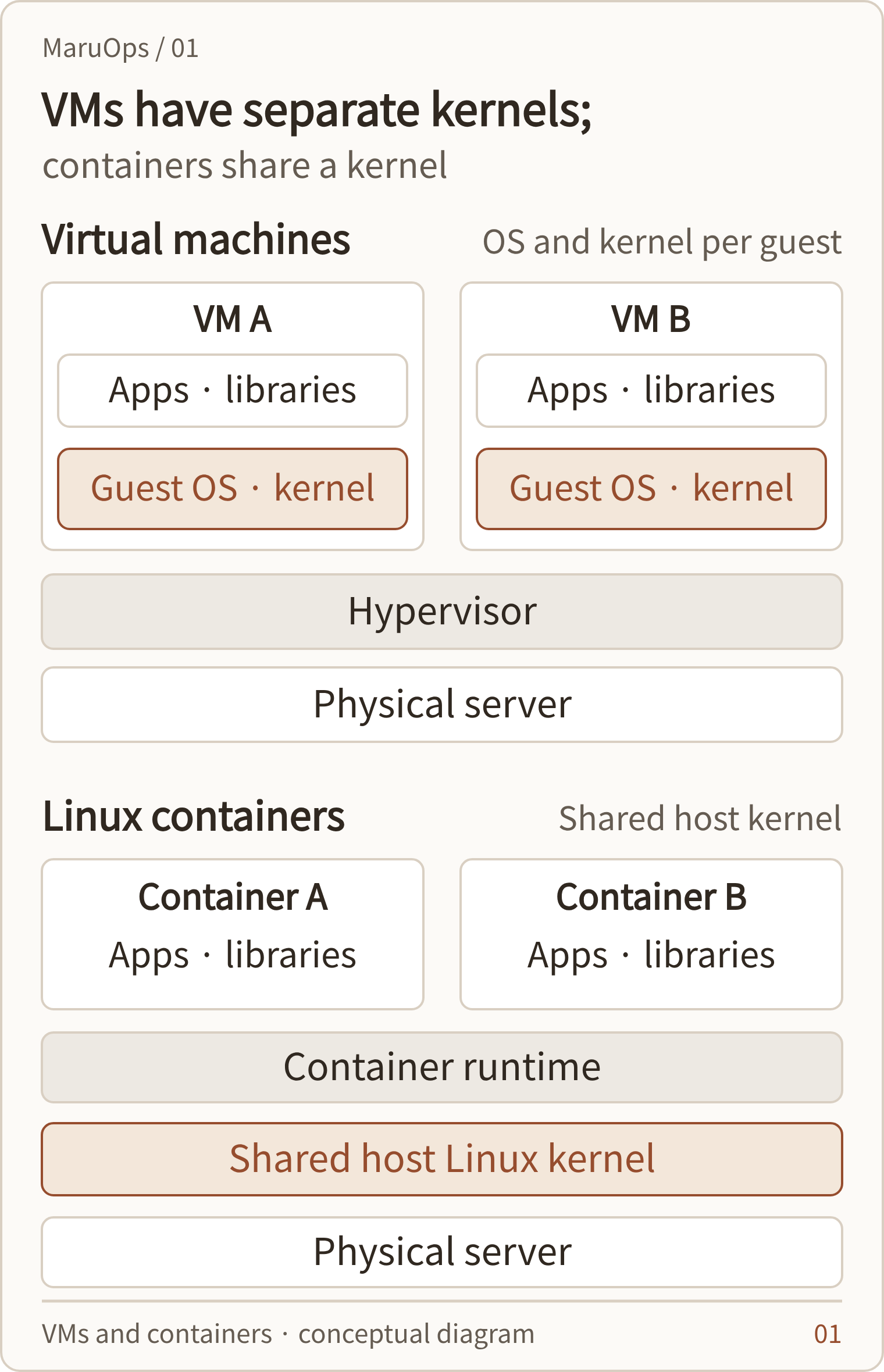
A virtual machine runs an independent guest operating system.
A virtual machine (VM) is an environment that runs a guest operating system on a virtual CPU, memory, disk, and network device provided by a hypervisor. You can put Windows Server VMs and Linux VMs on one physical server, and each VM boots its own kernel. The fact that operating system updates and service management are performed inside the guest is also similar to physical server operation.
The hypervisor arbitrates the use of hardware resources by multiple VMs. There are methods such as installing ESXi directly on the server and using it as an application on the desktop operating system, but you should not judge the structure just because the management program is visible on the screen. Microsoft describes Hyper-V as a Type 1 hypervisor that runs on top of hardware. Hyper-V structure and function
A container bundles processes and the files they need to run.
Containers are a method of running application processes and necessary libraries and configuration files in an isolated environment. A typical Linux container uses the host’s Linux kernel. Even if the image has the name Ubuntu or Alpine, it does not boot each kernel anew. Docker’s container description
Saying that ‘containers do not have an operating system’ is an oversimplification. It can contain your distribution’s user-space tools and libraries, and, depending on the image, a shell or package manager. It is convenient to understand why you can run images from different distributions together and why you cannot obtain features that are missing in the host kernel just by replacing the image.
In Linux, namespace divides the visible scope of processes, networks, mounts, etc., and cgroups are used to control resources such as CPU and memory. Based on this functionality, the runtime runs the container. The strength of isolation depends on permissions, device access, mounts, and security policies. Docker Engine Security Structure
| Compare items | virtual machine | Common Linux containers |
|---|---|---|
| execution unit | Guest operating systems and applications | Application processes and executable files |
| kernel | Guest kernel per VM | Kernel sharing on container hosts |
| Deployment deliverables | VM template, disk image, etc. | Container image and executable declaration |
| operational responsibility | Guest OS and application patches | Host kernel, runtime, and image patches |
An image is an execution environment, and a container is a running instance.
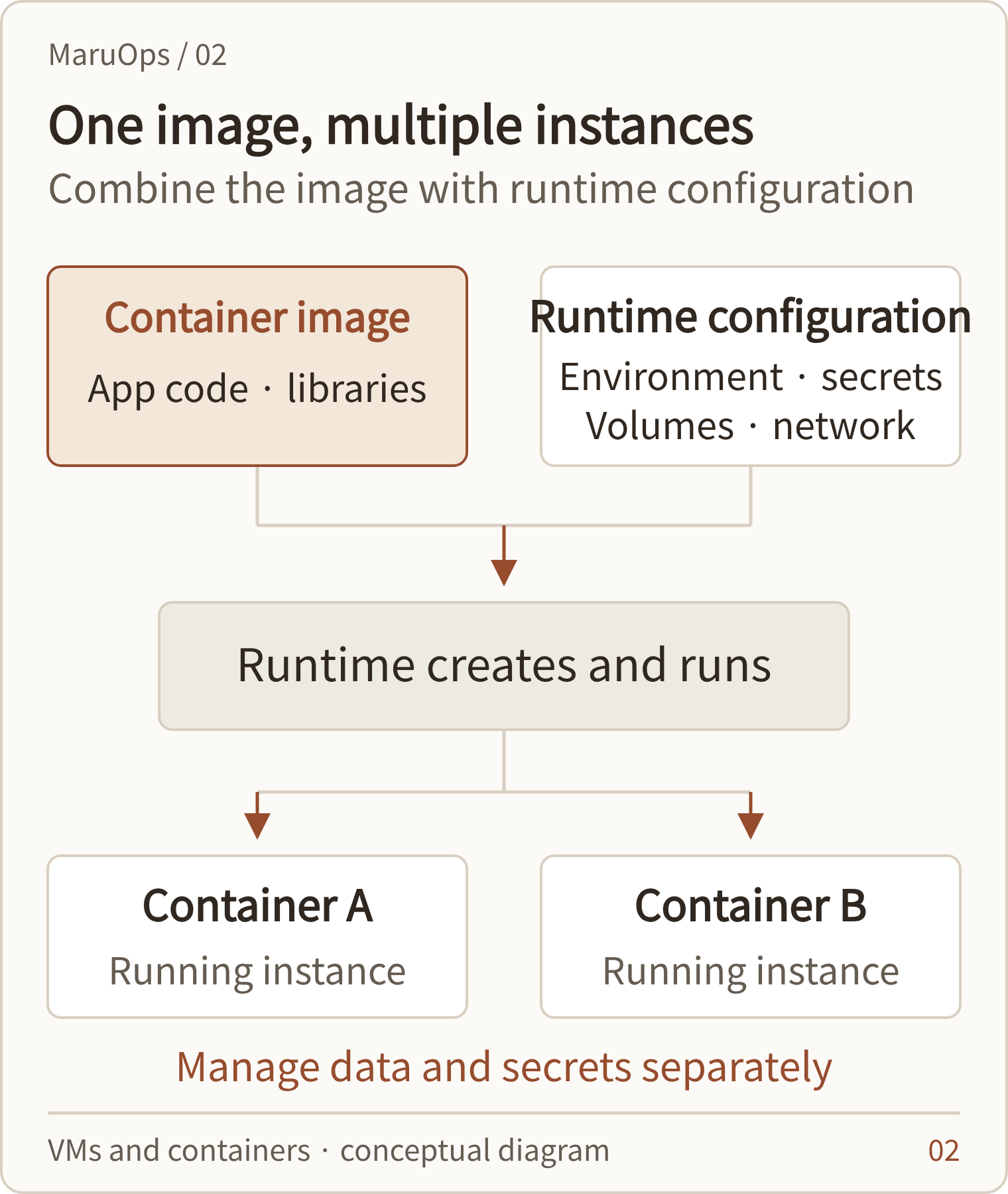
A container image is a deployment artifact that contains the files needed to run an application. The runtime uses this image to create and run containers. Even in the same image, operation may vary if the environment variables, secret, volume, and network settings are different.
Therefore, saving just one image does not mean that the entire service can be restored. Database data, certificates, external service addresses, secret information, and distribution settings are required for the actual service to run. The CPU architecture and required kernel functions must also match, so the expression ‘runs the same everywhere’ has an execution condition attached.
Docker is an ecosystem of tools and products that handle image creation and execution, and Kubernetes is an orchestration platform that deploys workloads on multiple nodes and maintains the desired state. Just because Kubernetes uses container images doesn’t mean Docker Engine is required on all nodes. You can use an implementation that works with Kubernetes’ runtime interface, such as containerd or CRI-O. Containers and runtime in Kubernetes
LXC is also a container, but the operating units are different.
LXC, found in Proxmox VE, is often used as a system container to separate multiple Linux system environments. The management perspective is different from the Docker method of deploying an application as an image. Although they both have a common feature of being a container technology that shares a kernel, the image format and management tools are not directly interchangeable. KVM·LXC Description of Proxmox VE
The performance difference is due to resource contention rather than startup speed.
Containers typically do not boot the entire guest OS, which is good for reducing initial launch overhead and native memory usage. However, if the image download is large or the application initialization is long, the service preparation time increases. The preparation time also varies depending on how the VM uses templates, pre-preparation, snapshot-based startup functions, etc.
Performance during operation is not determined by ‘VM or container’ alone. CPU allocation, memory pressure, NUMA placement, storage paths, network processing, encryption and application characteristics work together. Even with virtualization overhead, a well-designed VM can be better than a container host with high resource contention. To generalize that something is faster by a certain percentage, you need measurements under the same conditions.
Resource limits and reservations are viewed separately
If you do not specify limits on your containers, your application may use more memory and CPU than expected. Conversely, setting the limit too low may result in low-memory shutdowns or response delays due to CPU limitations. VMs can also degrade performance due to excessive vCPU allocation and memory overcommitment.
Request and limit in Kubernetes are not different names for the same value. request is used for scheduling and resource allocation decisions, and limit is involved in controlling the upper limit of usage. Exceeding the memory limit and CPU limit have different impacts on the application, so settings should be tailored to the actual load. Resource Management in Kubernetes
Performance testing looks at peak hour response latency, number of restarts, and storage latency, along with average utilization. Rather than how many nodes can be launched under normal conditions, it is more useful to determine the scale of operation whether the remaining nodes can cope when one node is maintained or lost due to a failure.
Isolation and security have different boundaries
VMs have a per-guest kernel with a hypervisor in between. Because typical containers share a host kernel, kernel vulnerabilities and excessive privileges can affect multiple containers. However, VMs also have risks of hypervisor vulnerabilities, management account takeover, and incorrect network settings.
When using containers, it is a good idea to grant only the necessary permissions without running the application as root unnecessarily. Mounting sensitive directories or runtime sockets on the host can significantly weaken the isolation boundary. Image vulnerability checks and host/runtime patches are managed as separate tasks. Docker permission/security advisory
If a service receives code from customers who do not trust each other, a separate review is needed to ensure that simple process isolation meets the requirements. You have the option of using a VM as a boundary or applying a sandbox runtime. No matter what configuration you use, you still need to divide management and data access rights.
Exceptions seen in Windows and desktop environments
Windows containers have process isolation, which shares the host kernel, and Hyper-V isolation, which provides a kernel boundary for each container with an optimized VM. If we assume that ‘all containers always share a host kernel’, we miss this difference. You should also check version compatibility of your host and container images. Microsoft’s Container Isolation Mode
When running Linux containers on macOS or Windows, a common configuration is to have a Linux VM underneath it. The Docker Desktop documentation also distinguishes between the Linux VMs running containers and the virtualization backends that run them. Just because you see Docker on your development PC doesn’t mean your Linux container uses the macOS kernel directly. Docker Desktop’s virtualized backend
How you store and recover your data determines the quality of your operations
If you store data only in the write layer of a container, the data may be lost when that container is deleted and recreated. Separate the data you want to keep into volumes, bind mounts, external storage, etc. Docker volumes can have a separate lifespan from their containers, but this does not prevent management operations from deleting them. Lifetime and backups of Docker volumes
Making containers easy to recreate is one thing, but recovering them without data loss is another. Reverting the image version does not automatically revert database schema changes. Before deployment, you must prepare schema compatibility and data recovery paths.
For VMs, it is common to recover both virtual disks and VM settings together. However, snapshots of a running VM do not guarantee application consistency across all databases. It is safer to design database backup functions, log archiving, and restore testing for both VMs and containers together.
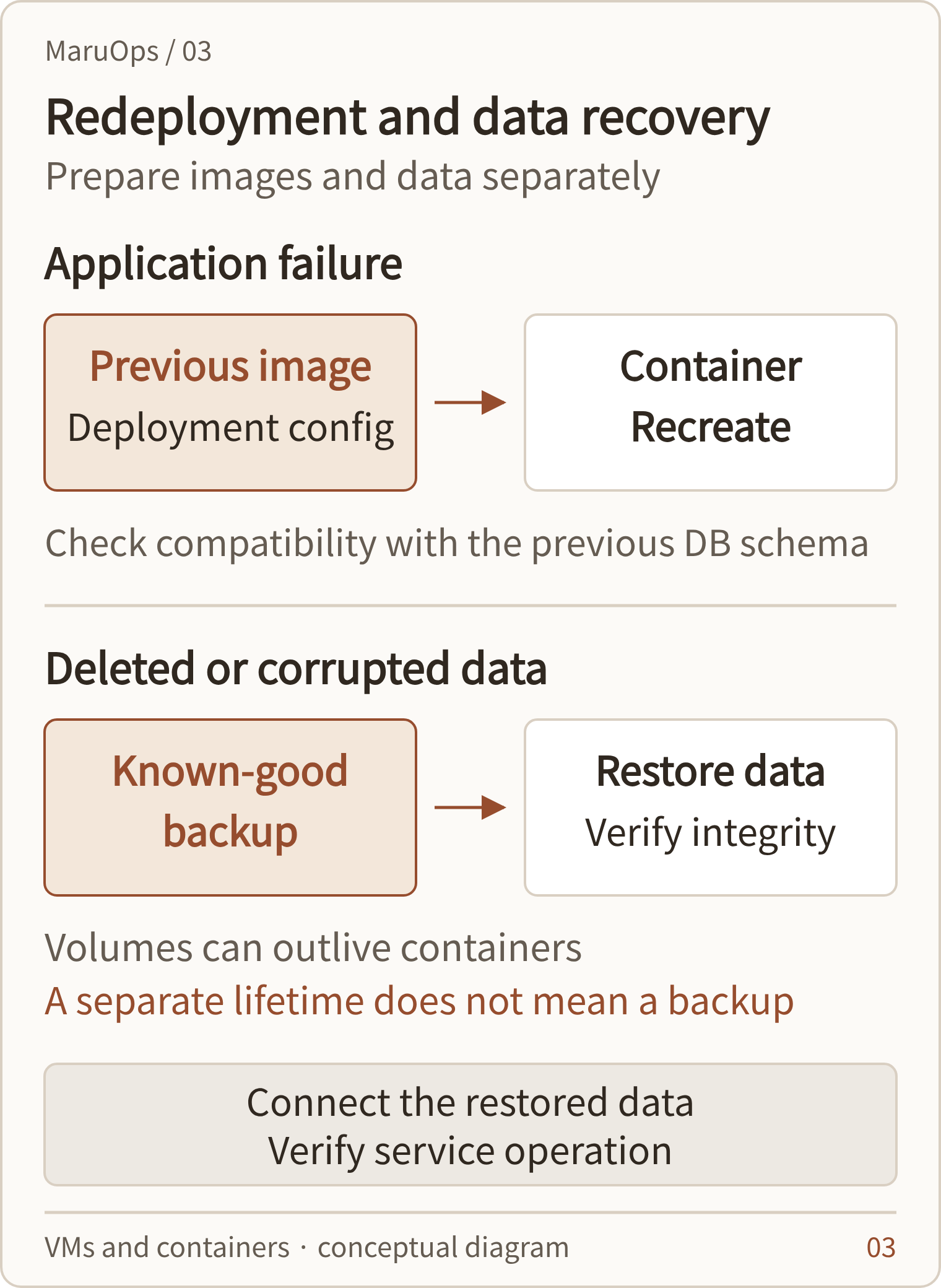
| situation | Recovery measures to prepare | An easy part to miss |
|---|---|---|
| Application version error | Redistribute using previous image/distribution settings | DB schema and backward compatibility |
| Container host failure | Data connection with the execution environment of other nodes | Local volume location and reconnection time |
| VM host failure | HA restart or VM restore | Accessing other hosts’ spare resources and storage |
| Data deletion/contamination | Normal point-in-time backup stored separately | Verification of integrity and business processing after restoration |
Structure that uses VMs and containers together
In an enterprise environment, you may encounter a configuration in which a hypervisor on top of a physical server runs VMs and uses those VMs as Kubernetes nodes. VMs provide a boundary between the operating system and infrastructure resources, and containers provide a unit of application deployment. The different layers that the two technologies cover provide a reason to use them together.
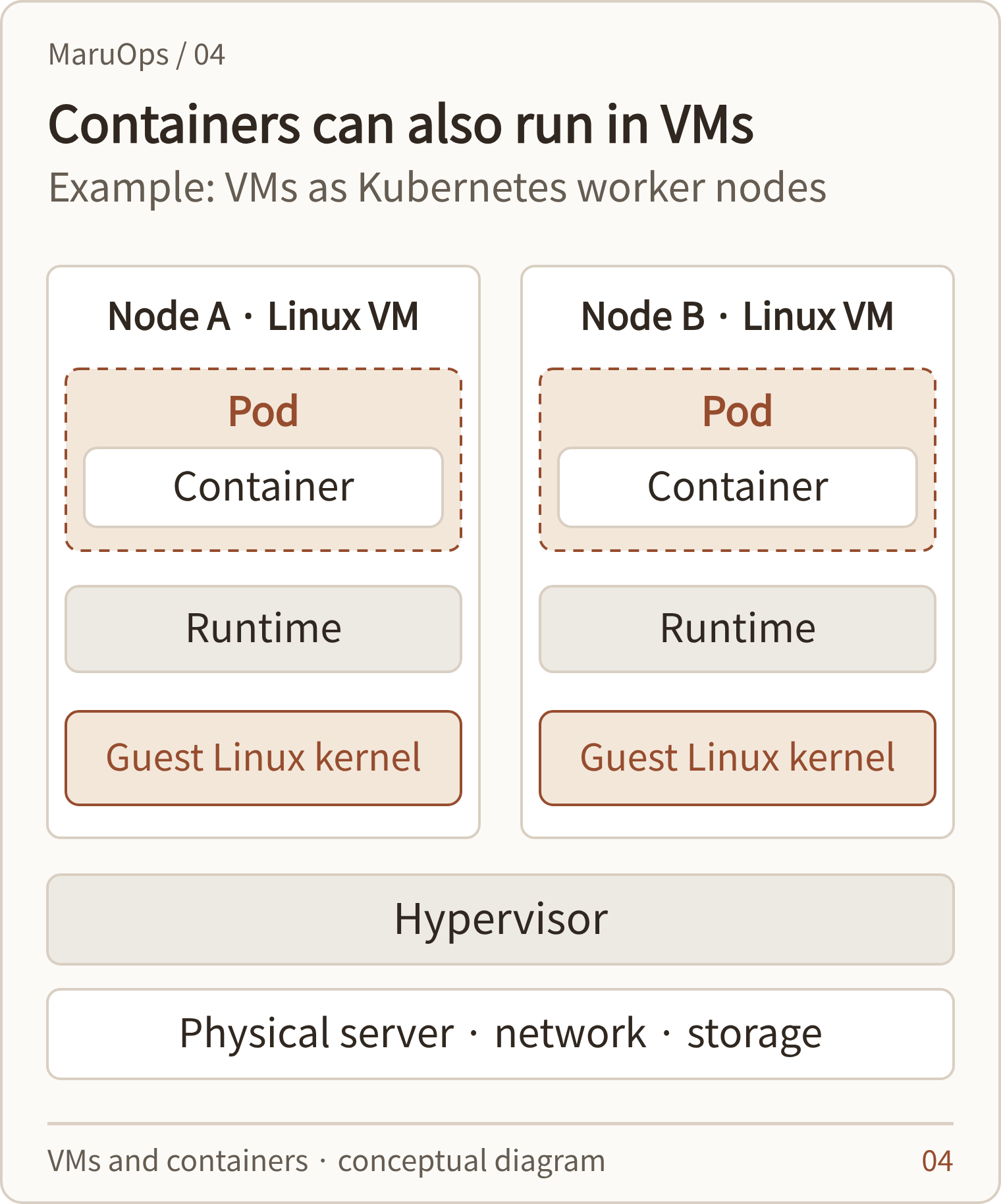
| hierarchy | Example role | What to manage |
|---|---|---|
| Physical server, network, storage | Actual calculation and data storage | Hardware health, capacity, and failure paths |
| Hypervisors and VMs | Separation of OS and resources for each node | VM placement, guest patching, infrastructure HA |
| Kubernetes and runtime | Application deployment/execution | Node status, Pod, network, volume |
| Applications and Data | User requests and business processing | Deployment, data consistency, service metrics |
In this architecture, infrastructure and application failure responses can overlap. Kubernetes can also redeploy Pods while the hypervisor restarts the VM on another host. Conditions for node failure detection, storage disconnection/connection, and duplicate execution prevention must be tested together. Simply turning on HA on a per-tier basis does not shorten the overall recovery time.
Look for selection criteria in your business needs
For tasks where the operating system version and kernel module must be maintained independently, or where a certified installation environment for existing software is important, it is recommended to consider VM first. Even if you need to move your current server without modifying your applications, maintaining the guest OS is a good starting point. However, product support and licensing conditions need to be checked separately.
If you frequently deploy the same service, scale it up to multiple instances, and manage the execution environment as an image, containers may be a good fit. At this time, file storage locations, session state, termination handling, and log collection must be organized to obtain operational benefits. Simply copying the existing installation directory to an image does not change the application structure.
| Requirements | Methods to consider first | Conditions to check together |
|---|---|---|
| Independent operation of different OS and kernels | VM | Guest support, patch and backup system |
| Frequently deploy and expand web and API | container | State separation, image management, observation tools |
| Transfer existing servers without major modifications | VM | Drivers, disk conversion, vendor support |
| Deploy the database to a new environment | review both sides | Storage latency, recovery, and certified operations |
| Separation of services from different teams | VM and container combination | Permissions, network policies, and scope of impact of failures |
For a first design, it is a good idea to pick one representative service and deploy, patch, node fail, and restore data once. The basis for selection is not so much installation time as the procedures required for operators to bring service back to life.
Reference documents and scope of application
Technical description and product documentation checked as of October 18, 2026. This article does not measure the performance of specific equipment, and performance and recovery times must be verified in actual configuration.



