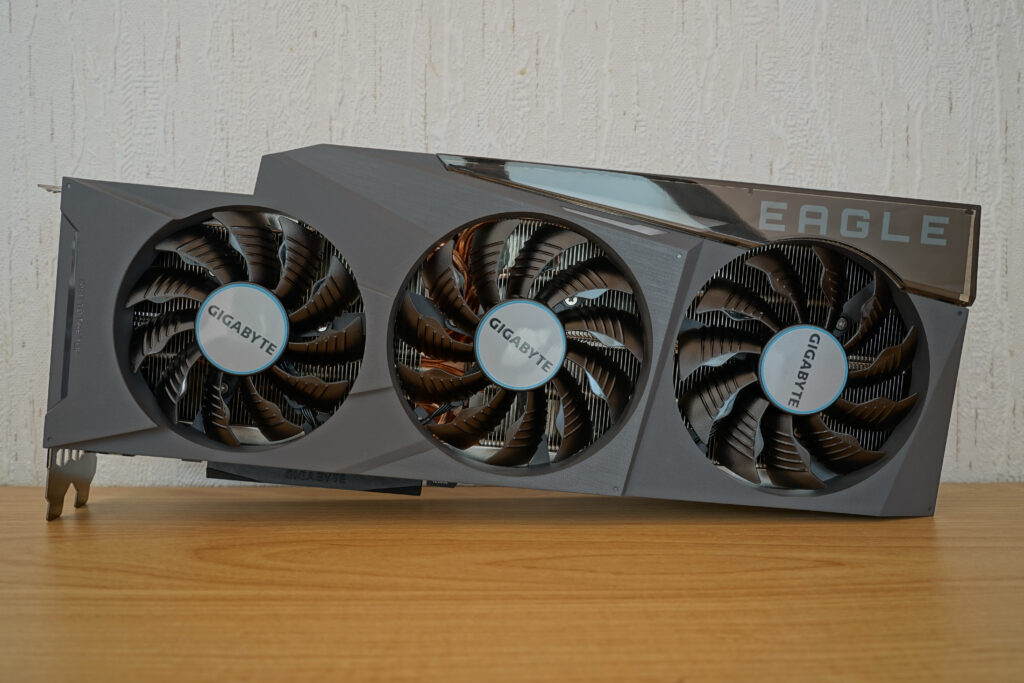
Load a small language model on an RTX GPU and serve answers through an HTTP endpoint with vLLM. The main paths cover NVIDIA RTX on Rocky Linux 9 and Ubuntu 24.04 or 26.04. Separate sections explain the hardware and runtime conditions that differ for AMD and Intel GPUs.
The base date is October 22, 2026, and the example image is fixed as v0.32.0. This is a follow-up guide created by checking the official documentation and distribution image information, and is not a review of running and measuring GPU inference on all three operating systems. The screenshots in the text are actual official document screens, and the representative photo is a photo of the RTX 3090 for reference.
On this page
Choose the path that suits your GPU
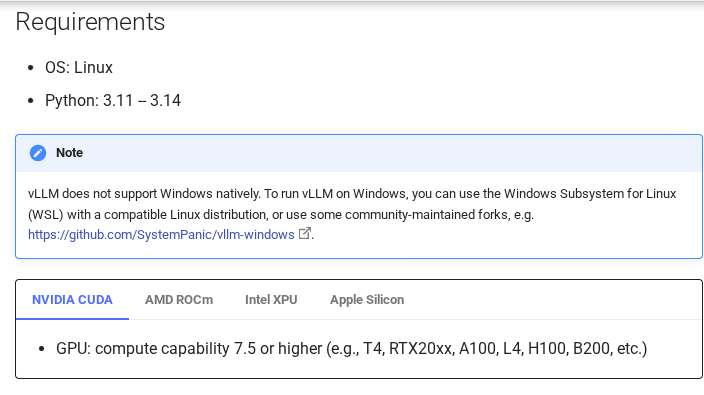
RTX uses CUDA, ROCm for supported AMD GPUs, and XPU path for supported Intel GPUs. When GPU manufacturers change, images and host drivers also change. Containers reduce installation differences, but they do not replace an unsupported GPU with a supported GPU.
| GPU | execution path | Conditions to check first |
|---|---|---|
| NVIDIA RTX 20, 30, 40, 50 series, etc. | vllm/vllm-openai | vLLM Compute Capability 7.5 or higher, driver and image CUDA compatibility |
| AMD Instinct/Select Radeon/Ryzen GPUs | vllm/vllm-openai-rocm | Accurate combination of GPU·gfx architecture·ROCm·OS·kernel |
| Supported Intel Arc/Data Center GPUs | vllm/vllm-openai-xpu | List of verified hardware, Intel driver and runtime combinations |
Compute Capability is the generation of compute capabilities supported by NVIDIA GPUs. This value is different from the VRAM capacity. Don’t just look at the product lines in the table above and assume that all features of each individual model are supported, but compare your model in the vLLM GPU installation document .
What vLLM does and choosing your first model
vLLM is an engine for language model inference and API serving. It schedules incoming work for the GPU, which is useful for a service handling concurrent requests. Installing it does not change a model’s answer quality or guarantee the lowest latency for a single request. See the vLLM introduction.
The first model is set to Qwen/Qwen2.5-1.5B-Instruct. It is a 1.5B class small conversation model, and you can check the Apache-2.0 license and vLLM usage examples on the official model card. Rather than showing off the latest large model, a good starting point is to download → load GPU → check the connection in the first response. (Qwen official model card)
The GPU memory VRAM contains not only the weights but also the calculation intermediate values and KV cache . The KV cache is a space that stores the values used to calculate the attention of previously processed tokens. The longer the input or the more conversations you process simultaneously, the greater the amount required.
| model scale | Simple calculation of only 16-bit weights | interpretation |
|---|---|---|
| 1.5B | About 3GB | For first load and API connection verification |
| 7B | About 14 GB | Can’t be sure there’s enough space left in 16GB VRAM |
| 8B | About 16 GB | Doesn’t mean the entire execution space will fit in 16GB VRAM |
This table is a rough weight-memory estimate calculated as parameter count multiplied by 2 bytes. It is not a benchmark or a guarantee that a model will run on a particular GPU. Begin with a short context and few concurrent requests. If memory runs out, reduce model size and context length to narrow the cause. See the vLLM memory-saving guide.
Ready for Rocky Linux 9·Ubuntu 24.04·26.04
The examples assume an x86_64 host, administrator privileges and ordinary Docker Engine. A VM needs access to a passed-through GPU. Rootless Docker and Podman have different runtime configurations and require separate procedures.
cat /etc/os-release
uname -r
uname -m
lspci -nn | grep -Ei 'VGA|3D|Display'
sudo docker version
If you do not have lspci, install sudo dnf install pciutils for Rocky and sudo apt install pciutils for Ubuntu. Both Client and Server must be visible in docker version. If you don’t have Docker, check the official installation procedure for Ubuntu or RPM series Docker installation procedure and the support range of your distribution first. Do not start by running commands to bulk delete packages from existing container servers.
| operating system | NVIDIA preparation path for this article | version check point |
|---|---|---|
| Rocky Linux 9 | DNF Driver → RPM Toolkit Repository | The minor version specified in the Toolkit support table is 9.7. Separate comparison with your own 9.x·kernel |
| Ubuntu 24.04 LTS | Ubuntu Driver Tools → DEB Toolkit repository | 24.04 specified in Docker and Toolkit support table |
| Ubuntu 26.04 LTS | Ubuntu Driver Tools → DEB Toolkit repository | 26.04 specified in Docker and Toolkit support table |
It was written based on the NVIDIA Container Toolkit support table and Docker Ubuntu support table confirmed on 2026-10-22. This table is for NVIDIA container configuration and does not mean that AMD and Intel have been automatically verified on the same OS.
Ubuntu 24.04·26.04: NVIDIA Driver
If nvidia-smi is already operating normally and meets the driver conditions in the image, reinstallation is skipped. On the new lab equipment, you can use Ubuntu’s driver tool to check for candidates and then install them. You will need to clean up your installation method before mixing it with an existing NVIDIA repository or a manual .run installation. (Ubuntu official NVIDIA driver guide)
sudo apt update
sudo apt install -y ubuntu-drivers-common pciutils
ubuntu-drivers devices
sudo ubuntu-drivers install
sudo reboot
After rebooting, reconnect and check the GPU and driver version with nvidia-smi. Devices that use Secure Boot also check the module signature and key registration procedures. If the automatically recommended driver does not meet the required CUDA 13 requirements in the image below, do not proceed, but check the latest driver installation path that supports your GPU and Ubuntu version.
Rocky Linux 9: NVIDIA Drivers
This NVIDIA RPM repository procedure is for an x86_64 lab machine with no existing driver installation and a Turing-or-newer GPU, such as the applicable RTX models. rhel9 is the repository identifier used for Rocky 9. Skip this step if the installed driver already works. See NVIDIA’s Rocky Linux installation guide.
sudo dnf install -y dnf-plugins-core pciutils
sudo dnf install -y kernel-devel-matched kernel-headers
sudo dnf config-manager --set-enabled crb
sudo dnf install -y epel-release
sudo dnf config-manager --add-repo \
  https://developer.download.nvidia.com/compute/cuda/repos/rhel9/x86_64/cuda-rhel9.repo
sudo dnf clean expire-cache
sudo dnf module enable -y nvidia-driver:open-dkms
sudo dnf install -y nvidia-open
sudo reboot
Open in open-dkms refers to the type of NVIDIA kernel module. This is not a command to install AMD drivers or Nouveau. If the module does not load even after rebooting, check whether the current kernel matches the development package, DKMS build status, and Secure Boot signature. Do not turn off SELinux without checking the cause.
Connect host GPU into Docker
Making GPUs visible to the host and making them visible to the container are two steps. First, the following command must succeed on the host: If that fails, fix the driver first before installing vLLM.
nvidia-smi
nvidia-smi --query-gpu=name,driver_version,memory.total,memory.free \
  --format=csv
The amd64 image setting of vllm/vllm-openai:v0.32.0 confirmed in this article records CUDA 13.0.2. Typical execution of the CUDA 13 series requires R580 or later drivers, and newer drivers may be required depending on actual GPU/capabilities. Do not apply compatibility bypass settings for data center GPUs to GeForce RTX. (Official Image Tag, NVIDIA CUDA Driver Compatibility Conditions)
The CUDA Version at the top of nvidia-smi is the CUDA level supported by the host driver. It does not refer to the CUDA Toolkit installed on the host or the CUDA version in the container. The container method below does not assume installation of nvcc on the host.
Toolkit for Ubuntu 24.04·26.04
Register NVIDIA’s DEB repository and signing key. If the same repository is already set up, do not register it twice and check the existing files first. The following code is for plain Docker. (NVIDIA Container Toolkit Installation Document)
sudo apt install -y curl ca-certificates gnupg
curl -fsSL https://nvidia.github.io/libnvidia-container/gpgkey \
  -o /tmp/nvidia-container-toolkit-gpgkey
sudo gpg --dearmor \
  -o /usr/share/keyrings/nvidia-container-toolkit-keyring.gpg \
  /tmp/nvidia-container-toolkit-gpgkey
curl -fsSL https://nvidia.github.io/libnvidia-container/stable/deb/nvidia-container-toolkit.list \
  -o /tmp/nvidia-container-toolkit.list
sed 's#deb https://#deb [signed-by=/usr/share/keyrings/nvidia-container-toolkit-keyring.gpg] https://#g' \
  /tmp/nvidia-container-toolkit.list | \
  sudo tee /etc/apt/sources.list.d/nvidia-container-toolkit.list
sudo apt update
sudo apt install -y nvidia-container-toolkit
Toolkit for Rocky Linux 9
In Rocky, the same Toolkit is installed from the RPM repository. Rather than running both the above Ubuntu command and this command, choose only one that matches your OS.
sudo dnf install -y curl
curl -fsSL https://nvidia.github.io/libnvidia-container/stable/rpm/nvidia-container-toolkit.repo \
  -o /tmp/nvidia-container-toolkit.repo
sudo install -m 0644 /tmp/nvidia-container-toolkit.repo \
  /etc/yum.repos.d/nvidia-container-toolkit.repo
sudo dnf install -y nvidia-container-toolkit
Check common runtime settings and GPU
Now register the NVIDIA runtime with Docker. nvidia-ctk modifies /etc/docker/daemon.json, so keep the existing settings. Docker restart may affect other running containers, so the operation server will allow time for the operation before proceeding.
if sudo test -f /etc/docker/daemon.json; then
  sudo cp -a /etc/docker/daemon.json "/etc/docker/daemon.json.before-nvidia-$(date +%Y%m%d-%H%M%S)"
fi
sudo nvidia-ctk runtime configure --runtime=docker
sudo systemctl restart docker

sudo docker pull vllm/vllm-openai:v0.32.0
sudo docker run --rm --runtime nvidia --gpus all \
  --entrypoint nvidia-smi \
  vllm/vllm-openai:v0.32.0
The GPU name and driver information should also be visible within the container. If you pass this point, you have confirmed the connection of Host Driver → Toolkit → Docker. Model loading and inference have not yet been verified. (Docker runtime setting basis)
Running servers with small models on RTX
The first run may take some time as it downloads the weights and prepares them for execution. The model cache is stored in Docker’s named volume. It can also reduce label problems that can occur when bind mounting an arbitrary home directory in Rocky’s SELinux environment.
sudo docker volume create maruops-vllm-hf-cache
sudo docker volume create maruops-vllm-compile-cache

sudo docker run -d --name maruops-vllm \
  --runtime nvidia --gpus '"device=0"' \
  --shm-size=4g \
  -p 127.0.0.1:8000:8000 \
  -v maruops-vllm-hf-cache:/root/.cache/huggingface \
  -v maruops-vllm-compile-cache:/root/.cache/vllm \
  vllm/vllm-openai:v0.32.0 \
  --model Qwen/Qwen2.5-1.5B-Instruct \
  --served-model-name local-qwen \
  --host 0.0.0.0 --port 8000 \
  --dtype half \
  --max-model-len 2048 \
  --max-num-seqs 2 \
  --gpu-memory-utilization 0.80

sudo docker logs -f maruops-vllm
device=0 selects the first GPU. If you have multiple GPUs, check and replace the number in nvidia-smi on the host. --dtype half uses FP16, and 2048 is the maximum context length of input and output combined. --max-num-seqs 2 limits the number of sequences executing simultaneously. These values are small experimental starting values and are not minimum specifications that will guarantee operation on all cards.
--gpu-memory-utilization 0.80 is the percentage of the GPU memory budget that the engine will use. There is no option to compress the model to 80% size. --shm-size=4g also does not increase GPU VRAM. This is the upper limit on the shared memory space between processes, and requires free physical host RAM. (vLLM execution options, official container usage)
Inside the server, it listens on the container’s 0.0.0.0:8000, and on the host it only publishes 127.0.0.1:8000. This is a setting to avoid opening the practice API without authentication to the entire Internet. When you are ready to view the log, just quit viewing the log with Ctrl+C. The server launched with -d continues to run.
First question: Ask your GPU to work the night shift
View the model list from another terminal on the same server. If the model download or engine initialization has not finished, wait a moment and check the log. We do not determine that the API is ready simply because the container is in a Running state.
curl --fail-with-body -sS http://127.0.0.1:8000/v1/modelsIf you check local-qwen in the list, send the conversation. The alias specified as --served-model-name must match model in the request. This is a call to vLLM’s Chat Completions route and is not a request to an external AI service. (vLLM API document)
curl --fail-with-body -sS http://127.0.0.1:8000/v1/chat/completions \
  -H 'Content-Type: application/json' \
  --data-binary @- <<'JSON'
{
  "model": "local-qwen",
  "messages": [
    {"role": "system", "content": "한국어로 간결하게 답하세요."},
    {"role": "user", "content": "너는 오늘부터 GPU 야간 근무 담당이야. 자기소개를 두 문장으로 해줘."}
  ],
  "temperature": 0.7,
  "max_tokens": 160
}
JSON
If successful, the answer is read from choices[0].message.content in the JSON response. There is no need to wait for a fixed answer phrase since the sentence content may vary from run to run. If usage is present, the number of input and output tokens is also checked. In this article, I did not include any unexecuted answers or speed figures as results.
For access from another PC during the lab, use an SSH tunnel. Run the following command on the client PC, replacing user and gpu-host with the actual SSH account and server address.
ssh -L 18000:127.0.0.1:8000 user@gpu-hostFrom the PC that opened the tunnel, connect to http://127.0.0.1:18000/v1/models. When changing to a public service, configure TLS, authentication, and request restrictions separately. Simply clearing the 127.0.0.1: portion of the port does not complete the operational configuration.
AMD GPU: Switch to ROCm path
AMD checks amdgpu driver·ROCm and device delivery instead of nvidia-smi and NVIDIA Container Toolkit. The vLLM document specifies the MI200·MI300·MI350, RX 7900·RX 9000 series, and some Ryzen AI GPUs. Not all products are eligible even if they use the same Radeon name. (vLLM ROCm requirement)
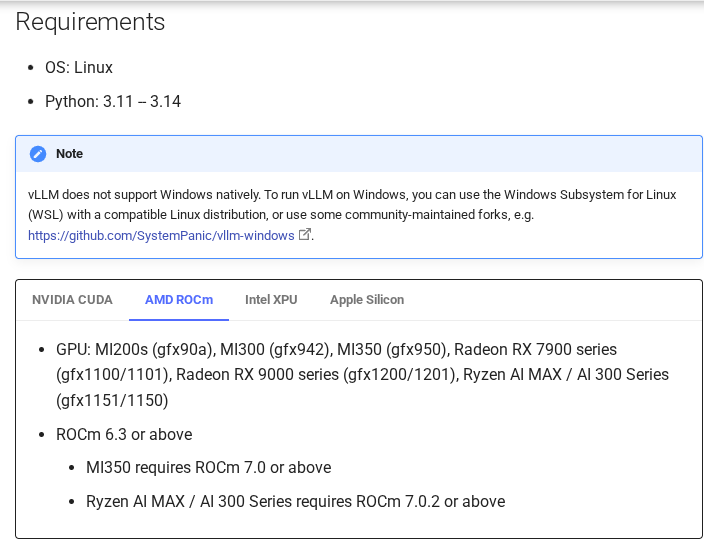
The confirmed build history of vllm/vllm-openai-rocm:v0.32.0 is based on ROCm 7.2.3. The OS table for those versions has Ubuntu 24.04.4 and Rocky Linux 9, but no Ubuntu 26.04. Therefore, the commands below do not lead to officially supported combinations in 26.04. To maintain 26.04, you must separately select a newer ROCm image/host driver combination for which support is specified. (ROCm 7.2.3 Compatibility Table by Version)
We also compare exact GPU, OS minor version, and kernel conditions in Ubuntu 24.04 and Rocky 9. In particular, you should not mix tables for Radeon and tables for Instinct. Also check to see if Rocky 9’s support footnotes are specific to specific Instinct products. OS support in the latest table is not retroactively applied to older images. (AMD Latest GPU/OS Compatibility Selection Table)
Once you have installed the correct host drivers and ROCm, first check your device and GPU. You should have /dev/kfd and /dev/dri, find the name gfx... in rocminfo corresponding to your GPU. To install the package, follow the procedure for the distribution/GPU selected in the AMD support table above.
ls -l /dev/kfd /dev/dri
rocminfo
If you used the same host for the NVIDIA exercise, first release port 8000 with sudo docker stop maruops-vllm. The following example targets a single AMD GPU lab machine with a verified support combination. The host GPU and image’s supported kernel targets must match.
VLLM_RENDER_GID=$(stat -c '%g' /dev/dri/renderD128)
VLLM_KFD_GID=$(stat -c '%g' /dev/kfd)
sudo docker volume create maruops-vllm-amd-hf-cache

sudo docker run -d --name maruops-vllm-amd \
  --device /dev/kfd --device /dev/dri \
  --group-add "$VLLM_RENDER_GID" --group-add "$VLLM_KFD_GID" \
  --shm-size=4g \
  -p 127.0.0.1:8000:8000 \
  -v maruops-vllm-amd-hf-cache:/root/.cache/huggingface \
  vllm/vllm-openai-rocm:v0.32.0 \
  --model Qwen/Qwen2.5-1.5B-Instruct \
  --served-model-name local-qwen \
  --host 0.0.0.0 --port 8000 \
  --dtype half \
  --max-model-len 2048 \
  --max-num-seqs 2 \
  --gpu-memory-utilization 0.80

sudo docker logs -f maruops-vllm-amd
renderD128 is an example device name. If the previous ls result is different, replace it with your GPU device. Pass the device’s numeric group ID so that access permissions can be matched even if the group name is different on the container and host. SYS_PTRACE and seccomp=unconfined from the official ROCm example were first excluded, and when a security policy error occurs, the necessary scope is determined by comparing the log and the official example. Once you’re ready, you can just use the previous curl request. (vLLM official ROCm image and execution example)
Intel GPU: Use separate XPU image
Intel uses an XPU backend. The validation hardware documentation for vLLM v0.32.0 shows Intel Arc Pro B-Series. This validation list should be read separately from the broader reference to Arc and data center GPUs in the installation documentation. This does not mean that all general Intel integrated graphics have been verified. (vLLM Intel Verification Hardware/Model List)
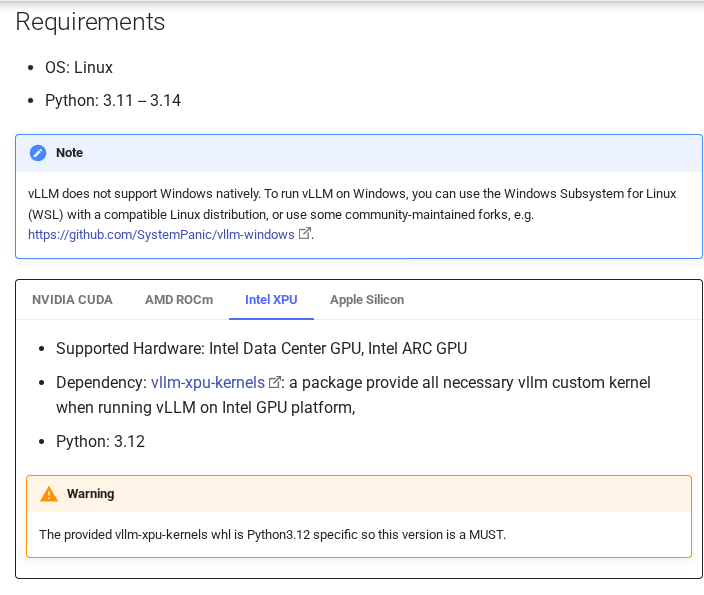
For any OS among Rocky 9·Ubuntu 24.04·26.04, first check the supported combination of GPU model and OS·kernel·runtime in the Intel GPU driver installation document. Containers do not replace host kernel drivers. When installing Python directly, the Python 3.12 conditions for the
The following is a startup command to verify device access on a single Intel GPU lab host with the supported drivers installed. If there are any NVIDIA/AMD containers launched earlier, stop them and clear port 8000.
ls -l /dev/dri
VLLM_RENDER_GID=$(stat -c '%g' /dev/dri/renderD128)
sudo docker volume create maruops-vllm-intel-hf-cache

sudo docker run -d --name maruops-vllm-intel \
  --device /dev/dri:/dev/dri \
  --group-add "$VLLM_RENDER_GID" \
  --shm-size=4g \
  -p 127.0.0.1:8000:8000 \
  -v maruops-vllm-intel-hf-cache:/root/.cache/huggingface \
  vllm/vllm-openai-xpu:v0.32.0 \
  --model Qwen/Qwen2.5-1.5B-Instruct \
  --served-model-name local-qwen \
  --host 0.0.0.0 --port 8000 \
  --dtype half \
  --max-model-len 2048 \
  --max-num-seqs 2 \
  --gpu-memory-utilization 0.80

sudo docker logs -f maruops-vllm-intel
Verify that renderD128 identifies your GPU device and change it if necessary. The official XPU example includes --privileged, host networking and a /dev/dri/by-path mount. The example above starts with fewer privileges for basic access to one GPU; it has not been verified across all Intel environments. For device discovery or communication failures, compare the official XPU run options and driver documentation.
Order of adjustment when VRAM is low
When you upload a large model, if the GPU gives OOM instead of the answer, OOM is an abbreviation for Out Of Memory, . Here, rather than changing the options all at once, let’s break down which space is lacking. (Official memory saving method)
- Check other GPU activity: NVIDIA looks at used processes and remaining memory in
nvidia-smi. Don’t arbitrarily kill other people’s processes. - Reduction from model: Failure during weight loading may not be resolved by simply reducing the context length. Review smaller models or quantized models supported by your GPU.
- Context length reduction: If KV cache space is insufficient, reduce it as
--max-model-len 1024, and also adjust the input + output of the request to that range. - Reduce the number of concurrent executions:Start with
--max-num-seqs 1and check for single requests first. - CUDA Graph Impact Isolation: Temporarily compares
--enforce-eagerwhen NVIDIA encounters memory issues during graph capture. This is not automatically a better setting as performance characteristics will vary.
Lowering --gpu-memory-utilization reduces the engine’s memory budget. It can leave room for other programs, but it can also reduce an already insufficient KV cache. Raising it to 0.99 without checking other users can conflict with display or other GPU workloads. The setting does not create additional VRAM.
Quantization is a way to express weights with a lower number of bits. The scope of support for formats such as AWQ, GPTQ, and FP8 varies depending on the GPU generation and backend. Rather than copying the --quantization value from the successful example for another card, check the vLLM Quantization Hardware Support Table.
Narrow down the cause to the location of the failure
| Stopping point/symptoms | Things to check first | Next check |
|---|---|---|
Host nvidia-smi failed | Driver module, reboot, Secure Boot | Current Kernel·DKMS·GPU passthrough |
| Host succeeds, GPU selection fails in Docker | Install toolkit and register Docker runtime | sudo docker info, whether to restart after setting the runtime |
| Error that CUDA driver is out of date | CUDA and host drivers in selected image | CUDA 13 image conditions in this article, drivers supported by GPU |
no kernel image·invalid device function | Kernel support for GPU architectures and images | NVIDIA Compute Capability or AMD gfx target |
| Download model 401·403 | Model access rights/license consent/token | Hugging Face’s actual model page |
| Only request connection failed/port conflict | Initialization log/port occupancy/connection location | sudo docker ps -a, ss -ltn, SSH tunnel |
| API error saying model not found | Whether local-qwen alias matches or not | /v1/models list and request JSON |
Model access errors are different from GPU computation errors. If you change the public model in this article to a model that requires approval, check the token and consent status first. The actual token is managed so that it is not exposed to text, screenshots, or command history. When troubleshooting, look at the first error and the initialization log before it, not just the last line. (vLLM Troubleshooting Document)
Quit/restart and next experiment
To stop or restart the NVIDIA example server, use the following command: For AMD and Intel, replace them with the container name specified above. Stopping and deleting are different, and the model cache volume is not deleted with the command below.
# 서버 중지
sudo docker stop maruops-vllm

# 기존 컨테이너를 같은 설정으로 재시작
sudo docker start maruops-vllm

# 실행 옵션을 바꾸려면 중지 후 컨테이너를 지우고 새로 생성
sudo docker stop maruops-vllm
sudo docker rm maruops-vllm
After the first response, keep one question fixed and change context length, concurrency or model size one at a time. Record initial loading separately from response time on a ready server. Evaluate quality and speed separately, since the same input can still produce different answers.
The next experiment can be continued with Measure loading time, first response, and generation speed separately. Once your GPU has started taking orders, it’s time to see how busy it is and where it’s waiting.
References and image sources
- vLLM v0.32.0 GPU requirements·Docker·ROCm·XPU execution example·Memory settings
- NVIDIA Rocky Linux Driver · Ubuntu NVIDIA Driver · Container Toolkit Installation · Toolkit Support OS
- AMD GPU·OS Compatibility·Intel Verification Hardware·Qwen2.5-1.5B-Instruct Model Card
Chapter 3 of the document screen was captured from the vLLM official site in an actual browser. The content of the document was not changed, and only the necessary areas were cut and marked. © vLLM contributors, Apache License 2.0. Original license copy is also provided. The photographer, original source, and terms of use of representative photos are indicated below the photo.